Review Comments (0) Screenshots (7) Questions & Answers (0) Votes (4) Awards (6) Wiki  
(4)
OJOsoft Corporation
2.7.6.419
ojosoft.com
Shareware
$23.95  Purchase
246 people
Download OJOsoft MKV...

10.59 MBDownloaded 833 times

This software was checked for viruses 5 months ago and was found to contain no viruses.
Click here to see antivirus report.
 

Review

This is official description

A stable and simple-to-use MKV video converter can convert MKV files to most popular video/audio formats with a few steps. Safe to install and free to try.OJOsoft WKV Converter can help you convert MKV files to AVI, WMV, MP4, MOV,3GP/3G2, MPG, MPEG, VOB, TS, H.264, FLV and MP3.
 
The following review written by one of the Software Informer contributors applies to version 2.6

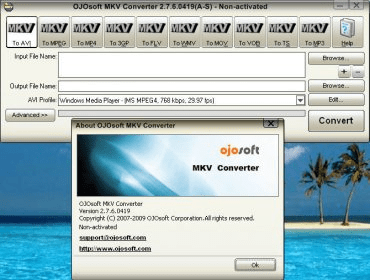
OJOsoft MKV Converter is an application that enables you to convert MKV files into different video files. This program allows you to convert your MKV files into AVI, Mp4, MPEG, 3GP, FLV, WMV, MOV, VOB, TS and Mp3. The program has a very simple and concise interface that will guide you step by step on how to convert your files from one format into another. No user should have any problem with using this application, but in case you are having trouble figuring out how to get your files converted there is a help menu at the top of the program's main window.

The new version of the application has the advantage of supporting Windows Vista. OJOsoft MKV Converter allows you to edit every video profile by setting output parameters such as extension, image size, video compression, bit rate, frame rate, audio format, audio channels, audio bit rate, audio frequency, volume and more. It allows you to convert many files at the same time. You can set the program to convert the files and leave the computer whenever you want. This program also comes with advanced settings for your conversions.
  • It allows you to convert MKV files into different files with at high conversion speed.
  • It can be considered expensive by some users.
  • It doesn't come with a media player.

Reviewed by: Sebastian Fernandez

Reviewer rating:

Reviewed: 2 years ago

What's new in version 2.0

More friendly and easier-to-use user interface. Add more profiles and support to edit profiles. Support to specify the output folder. All known bugs fixed.
Report a wrong version Report a wrong program title Suggest a correction

Screenshots

Main window Main window Main window Main window FLV profiles FLV profiles Edit MOV profiles Edit MOV profiles
All 7 screenshots

Latest comments


There are no comments, be the first one!
Add new comment

E-mail Address:

Password:

Register now »

Forgot password?

Sign in with:
Download Software Informer Client
Copyright © 2012, Informer Technologies, Inc. About| Privacy and terms| Help| Feedback & Support| Partners program
